
What is phishing?
Phishing describes a type of social engineering where attackers influence users to do 'the wrong thing', such as disclosing information or clicking a bad link. Phishing can be conducted via a text message, social media, or by phone, but these days most people use the term 'phishing' to describe attacks that arrive by email. Email is an ideal delivery method for phishing attacks as it can reach users directly and hide amongst the huge number of benign emails that busy users receive.
Phishing emails can hit an organisation of any size and type. Aside from the theft of information, attacks can install malware (such as ransomware), sabotage your systems, or steal money through fraud. You might get caught up in a mass campaign (where the attacker is just looking to collect some new passwords or make some easy money), or it could be the first step in a targeted attack against your company, where the aim could be something much more specific, like the theft of sensitive data. In a targeted campaign the attacker may use information about your employees or company to make their messages even more persuasive and realistic. This is usually referred to as spear phishing.
Tips for identifying a phishing email
Tip 1: Don’t trust the display name
A favourite phishing tactic among cybercriminals is to spoof the display name of an email.
Here’s how it works: If a fraudster wanted to spoof the hypothetical brand “My Bank,” the email may look something like:
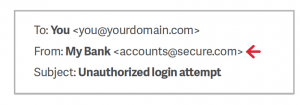
Since My Bank doesn’t own the domain “secure.com,” DMARC will not block this email on My Bank’s behalf, even if My Bank has set their DMARC policy for mybank.com to reject messages that fail to authenticate. This fraudulent email, once delivered, appears legitimate because most user inboxes only present the display name. Don’t trust the display name. Check the email address in the header from—if looks suspicious, don’t open the email.
Tip 3: Check for spelling mistakes
Brands are pretty serious about email. Legitimate messages usually do not have major spelling mistakes or poor grammar. Read your emails carefully and report anything that seems suspicious.
Tip 4: Analyse the salutation
Is the email addressed to a vague “Valued Customer?” If so, watch out—legitimate businesses will often use a personal salutation with your first and last name.
Tip 5: Don’t give up personal information
Legitimate banks and most other companies will never ask for personal credentials via email. Don’t give them up.
Tip 6: Beware of urgent or threatening language in the subject line
Invoking a sense of urgency or fear is a common phishing tactic. Beware of subject lines that claim your “account has been suspended” or your account had an “unauthorized login attempt.”
Tip 7: Review the signature
Lack of details about the signer or how you can contact a company strongly suggests a phish. Legitimate businesses always provide contact details.
Tip 8: Don’t click on attachments
Including malicious attachments that contain viruses and malware is a common phishing tactic. Malware can damage files on your computer, steal your passwords or spy on you without your knowledge. Don’t open any email attachments you weren’t expecting.
Tip 9: Don’t believe everything you see
Phishers are extremely good at what they do. Just because an email has convincing brand logos, language, and a seemingly valid email address, does not mean that it’s legitimate. Be skeptical when it comes to your email messages—if it looks even remotely suspicious, don’t open it.
Reduce the information available to attackers
Attackers use publicly available information about your organisation and users to make their phishing (and particularly spear phishing) messages more convincing. This is often gleaned from your website and social media accounts (information known as a 'digital footprint').
How do I do this?
- Understand the impact of information shared on your organisation's website and social media pages. What do visitors to your website need to know, and what detail is unnecessary (but could be useful for attackers)?
- Be aware of what your partners, contractors and suppliers give away about your organisation online.
- Help your staff understand how sharing their personal information can affect them and your organisation, and develop this into a clear digital footprint policy for all users. This is not about expecting people to remove all traces of themselves from the Internet. Instead support them as they manage their digital footprint, shaping their profile so that it works for them and the organisation.
- CPNI’s Digital Footprint Campaign contains a range of useful materials (including posters and booklets) to help organisations work with employees to minimise online security risks.
0 Comments