
The WannaCry ransomware attack is an ongoing cyberattack of the WannaCry ransomware cryptoworm, targeting the Microsoft Windows operating system, encrypting data and demanding ransom payments in the cryptocurrency bitcoin.
What is it?
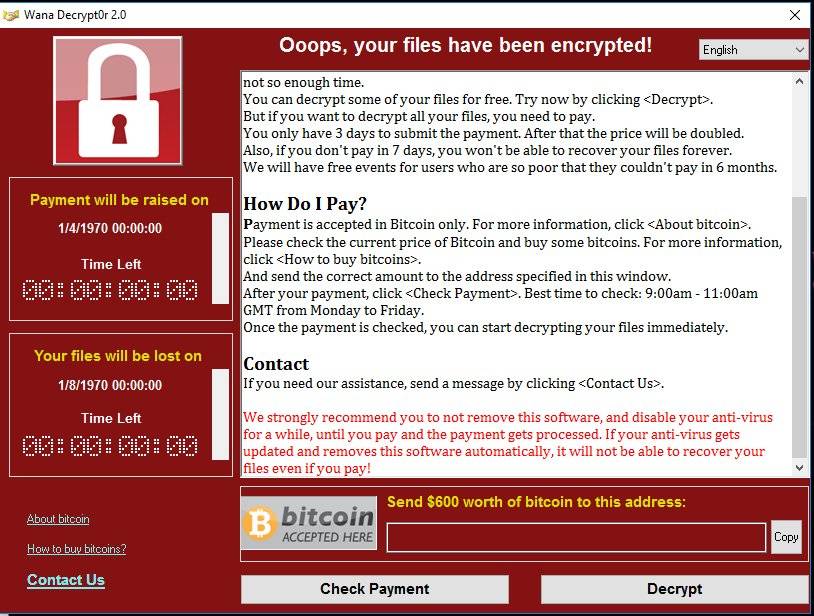
The virus in question is a ransomware program targets all versions of Windows computers. This ransomware will encrypt files using a strong encryption that is almost impossible to crack. When it has finished encrypting your files, it will display a splash screen demanding payment in order to decrypt the files.
If the payment is not made in time, access to all of the files will be lost. The only good way to recover from the virus is by restoring from a backup.
How do you become infected ?
This infection is typically spread through emails sent to company email addresses. These emails traditionally contain a zip file that when opened will infect the computer. These zip files contain executables that are disguised as PDF files, Word, Excel, office files or any sort of document that can use macros. The infection can also spread and wreak havoc on your network if not stopped. Please be cautious with ANY attachment even from colleagues and known organisations.
How to prevent infection
Exercise EXTREME caution when opening any attached files even if it from a known source or organisation. If in doubt do not open the file, NEVER enable Macros (unless you know what you are doing and why you want them) The virus has the capability to encrypt ALL the data you connect to, this includes company servers and all the data that resides on them.
How do you become infected ?
This infection is typically spread through emails sent to company email addresses. These emails traditionally contain a zip file that when opened will infect the computer. These zip files contain executables that are disguised as PDF files, Word, Excel, office files or any sort of document that can use macros. The infection can also spread and wreak havoc on your network if not stopped. Please be cautious with ANY attachment even from colleagues and known organisations.
How to prevent infection
Exercise EXTREME caution when opening any attached files even if it from a known source or organisation. If in doubt do not open the file, NEVER enable Macros (unless you know what you are doing and why you want them) The virus has the capability to encrypt ALL the data you connect to, this includes company servers and all the data that resides on them.
What we will be doing
As this new virus has been built using stolen NSA technology it is likely to be able to circumvent all known anti malware and anti virus technology. MSL will be contacting our PC using clients and running updates as the day progresses.
IF YOU THINK YOU HAVE BEEN INFECTED OR HAVE OPENED A INFECTED FILE
Immediately shutdown your PC, if it doesn’t shutdown, force it to shut down by holding the power button for 10 seconds, unplug the ethernet cable and contact MSL
What the virus may display on your screen:
What the virus may display on your screen:
0 Comments